

NICE AUTOMATION UAE
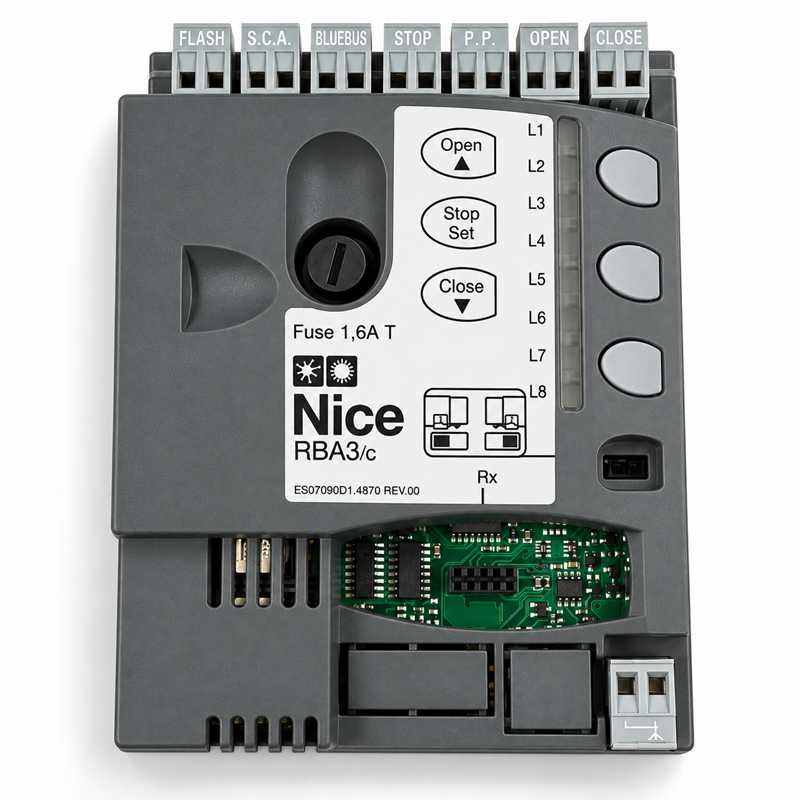
NICE RBA3/C ROBUS Sliding Gate Control Board UAE
Genuine NICE Product
UAE Delivery
Technical Support
Price 650 AED In Stock
NICE RBA3/C Replacement PCB for RB400 RB600 & RB1000
The NICE RBA3/C Control Board is an original replacement electronic control unit designed for the classic NICE ROBUS sliding gate motor range.
Official NICE technical documentation identifies the RBA3/C control unit for models including RB400, RB600, RB600P, RB1000 and RB1000P.
The board manages the main gate automation functions including motor operation, BlueBUS safety devices, gate travel learning, automatic closing, partial opening, command inputs, flashing-light output and compatible NICE radio receiver integration.
The RBA3/C is intended mainly as a replacement control board when the original PCB in a compatible NICE ROBUS motor has failed but the motor, gearbox and mechanical components remain serviceable.
NICE RBA3/C Key Features
- Original NICE replacement control board
- Official model: RBA3/C
- Designed for classic NICE ROBUS sliding gate motors
- Compatible with NICE RB400
- Compatible with NICE RB600
- Compatible with NICE RB600P
- Compatible with NICE RB1000
- Compatible with NICE RB1000P
- BlueBUS accessory interface
- Automatic recognition of compatible BlueBUS devices
- Gate travel learning
- Motor force management
- Adjustable operating parameters
- Automatic closing
- Partial / pedestrian opening
- STOP safety input
- Step-by-Step command input
- OPEN and CLOSE command inputs
- Flashing-light output
- Gate-status output
- SM receiver connector for compatible NICE radio receivers
NICE RBA3/C Compatibility
| Motor Model | Control Board | Status |
| NICE ROBUS RB400 | RBA3/C | Officially Documented |
| NICE ROBUS RB600 | RBA3/C | Officially Documented |
| NICE ROBUS RB600P | RBA3/C | Officially Documented |
| NICE ROBUS RB1000 | RBA3/C | Officially Documented |
| NICE ROBUS RB1000P | RBA3/C | Officially Documented |
| NICE RUN1500 | RBA3 / RBA3 family | Verify Exact Existing Board |
| NICE RUN1500P | RBA3 / RBA3 family | Verify Exact Existing Board |
| NICE RB250HS | RBA3/HS | Not RBA3/C |
| NICE RB500HS | RBA3/HS | Not RBA3/C |
| NICE RBS400 | Newer Control Platform | Not RBA3/C |
| NICE RBS600 | Newer Control Platform | Not RBA3/C |
Official ROBUS RBA3/C Application
NICE technical documentation for the classic ROBUS range identifies the control units as follows:
- RB400 – RBA3/C
- RB600 / RB600P – RBA3/C
- RB1000 / RB1000P – RBA3/C
- RB250HS – RBA3/HS
- RB500HS – RBA3/HS
This distinction is important when selling replacement electronic boards.
RBA3/C vs RBA3/HS
| Control Board | Main Documented Motors |
| RBA3/C | RB400, RB600, RB600P, RB1000, RB1000P |
| RBA3/HS | RB250HS, RB500HS and related HS versions |
Do not supply the standard RBA3/C in place of an RBA3/HS simply because both boards belong to the ROBUS family.
RBA3/C vs RBA3
The names RBA3 and RBA3/C are sometimes used interchangeably in spare-parts listings, but NICE documentation can show the precise integrated board as RBA3/C for specific classic ROBUS motors.
For a replacement sale, the safest method is to match the code printed on the existing PCB and the exact motor model.
Check the Existing PCB Before Ordering
Before supplying a replacement RBA3/C, confirm:
- Motor model number
- Existing PCB code
- Board revision
- Terminal layout
- Motor generation
- Limit-switch type
- Radio receiver type
BlueBUS Technology
The NICE RBA3/C supports BlueBUS, NICE's two-wire accessory connection system.
Compatible BlueBUS devices receive power and exchange control information over the same two wires.
BlueBUS devices are connected in parallel and recognised by the control unit during commissioning.
BlueBUS Photocells
Compatible BlueBUS photocells can be connected to the BlueBUS terminals and learned by the RBA3/C.
Suitable NICE BlueBUS photocell families include selected models such as:
- EPMB
- EPMOB
- EPMAB
- EPLB
- MOFB
- F210B
Always verify the exact device generation and installation manual.
EPM vs EPMB
NICE EPMB is a BlueBUS photocell and is suitable for BlueBUS installations where supported.
NICE EPM is a conventional relay-output photocell and should not be connected directly to the BlueBUS terminals.
If a conventional photocell is required, it must be wired according to a suitable conventional safety-input arrangement.
BlueBUS Device Recognition
After replacing the RBA3/C or changing BlueBUS accessories, the control unit may require a new device-recognition procedure.
Do not assume that newly connected photocells are automatically configured until the required learning procedure has been completed.
Motor Travel Learning
The RBA3/C supports automatic learning of the gate movement and travel parameters.
After replacing the board, the installer should perform the correct learning procedure and verify the complete opening and closing cycle.
Obstacle Detection
The control board monitors motor behaviour and can respond to abnormal resistance when correctly commissioned.
Obstacle detection performance depends on:
- Correct gate travel learning
- Motor-force settings
- Gate mechanics
- Rack alignment
- Gate weight and friction
- Correct safety-device installation
Motor-force sensing does not replace photocells or other required safety devices.
Adjustable Motor Force
The controller provides programmable operating parameters including motor-force adjustment.
Force should not simply be increased to compensate for a gate that is mechanically difficult to move.
Check Mechanical Resistance First
Before increasing motor force, inspect:
- Sliding gate wheels
- Track condition
- Gate alignment
- Nylon or steel rack alignment
- Pinion engagement
- End stops
- Manual movement resistance
Automatic Closing
The RBA3/C supports automatic closing when correctly programmed.
For installations using automatic closing, ensure the photocells and other required safety devices are correctly installed and tested.
Partial / Pedestrian Opening
The control board supports partial-opening functions where configured.
This can allow a sliding gate to open only enough for pedestrian access instead of completing the full travel.
Step-by-Step Command Input
A normally-open push button, radio receiver relay, GSM controller or access-control relay can typically operate the gate through the P.P. / Step-by-Step command input.
The external device should normally provide a momentary dry contact.
OPEN Input
The OPEN input can be used for a dedicated opening command where required.
CLOSE Input
The CLOSE input can be used for a dedicated closing command where the control configuration supports it.
STOP Safety Input
The STOP input is intended for compatible safety devices and must be configured according to the actual device type.
Depending on the installation, NICE systems can support different STOP contact arrangements, including normally-open, normally-closed and resistive safety devices when correctly configured.
Push Button Connection
A standard normally-open push button can normally be connected between the appropriate common/control terminals and the P.P. input.
Depending on the programmed command sequence, successive pulses can perform operations such as:
- Open
- Stop
- Close
External GSM Gate Opener
A GSM gate opener should normally connect through its relay contact to a low-voltage command input such as OPEN or P.P..
The GSM controller must not directly power the gate motor.
Access Control Integration
Compatible access-control devices can operate the RBA3/C through a dry-contact command.
Typical applications include:
- RFID readers
- Keypads
- Intercom relays
- GSM controllers
- Vehicle access systems
- External receivers
Radio Receiver Connector
The RBA3/C includes an interface for compatible NICE plug-in radio receivers.
The exact receiver must be selected according to the control-board generation and radio protocol required.
NICE OXI / OXIBD Receivers
Compatible NICE plug-in receiver modules can be used where the RBA3/C receiver interface supports the exact model.
Older installations may originally use OXI-family receivers, while later replacement arrangements may vary.
Advanced bidirectional features require compatibility across the control board, receiver and remote transmitter.
NICE OX2 Receiver
The NICE OX2 should not be shown as a direct plug-in receiver for RBA3/C.
OX2 is a pre-wired external receiver with relay outputs.
It can still be connected to RBA3/C through an appropriate dry-contact command input.
NICE OXIFM Receiver
Do not automatically list OXIFM as compatible unless the exact receiver socket and 868.46 MHz radio system are verified.
OXIFM belongs to a different radio-frequency family from common 433.92 MHz NICE systems.
Remote Compatibility
Remote-control compatibility is determined mainly by the installed radio receiver.
The RBA3/C itself does not mean every NICE remote will work.
Always check:
- Receiver model
- Remote frequency
- Radio protocol
- Receiver memory
433.92 MHz Alone Does Not Guarantee Compatibility
Two remotes can both operate at 433.92 MHz and still use different coding protocols.
Always match the transmitter to the installed radio receiver.
Flashing Light Output
The RBA3/C provides an output for a compatible flashing warning light.
The exact flashing-light voltage and maximum load must be checked against the installed ROBUS manual and board revision before connecting a replacement lamp.
Do Not List ELAC as Directly Compatible
The NICE ELAC is a 90–240 VAC flashing light.
It should not be listed as a direct RBA3/C flashing-light accessory unless the actual control output and wiring arrangement are specifically verified.
Low-Voltage Flashing-Light Systems
Classic ROBUS documentation uses low-voltage flashing-light arrangements.
Therefore, choose the replacement warning lamp according to the official output specification rather than simply selecting any NICE flashing light.
Gate Open Indicator Output
The control system provides status-indicator functionality that can be used for compatible warning or gate-status devices where correctly configured.
Backup Battery
Selected classic ROBUS systems support the NICE PS124 backup battery system.
Compatibility should be verified against the exact motor and board configuration before installation.
Power Failure Operation
If a backup-battery system is fitted and operating correctly, the automation may continue limited operation during a mains failure.
Without backup power, the motor can normally be manually released using the mechanical release mechanism.
Master / Slave Operation
Classic NICE ROBUS systems can support synchronised operation of two motors in suitable Master / Slave installations.
Commissioning must follow the exact NICE procedure for the specific ROBUS generation.
RBA3/C Diagnostics
The RBA3/C uses onboard LEDs and programming controls to assist with commissioning and fault diagnosis.
LED flashing patterns should always be checked against the correct motor manual because different patterns represent different system conditions.
Gate Opens but Does Not Close
If a gate opens but will not close, inspect:
- BlueBUS photocell status
- Photocell alignment
- STOP input
- Safety-device learning
- Limit-switch operation
- Control-board diagnostics
- Closing command configuration
Gate Does Not Respond to Remote
If wired commands work but the remote does not, check:
- Plug-in receiver
- Receiver programming
- Remote frequency
- Radio coding
- Remote battery
- Aerial connection
Control Board Completely Dead
If there are no LEDs or signs of operation, first check:
- Mains power
- Transformer output
- Board fuse
- Loose connectors
- Water damage
- Burned components
Do not replace the PCB before confirming that the external power supply is correct.
Water-Damaged RBA3/C
If water has entered the motor enclosure, replace or repair the source of water ingress before fitting a new control board.
Installing a new PCB without correcting the enclosure problem can result in repeated failure.
Lightning and Power Surge Damage
Gate control boards can be damaged by electrical surges, lightning events or unstable mains supply.
Where a board has failed after a surge, inspect connected accessories and wiring before installing the replacement controller.
Shorted Accessories
A short circuit in photocell, flashing-light or external-accessory wiring can create faults that appear to be control-board problems.
Check connected accessories before replacing the board unnecessarily.
Replacement Procedure
- Disconnect the gate automation from mains power.
- Confirm the existing board is RBA3/C or a documented compatible revision.
- Photograph all terminal connections.
- Label external wiring where necessary.
- Remove the radio receiver and reusable modules.
- Replace the control board.
- Reconnect the motor and limit wiring.
- Reconnect BlueBUS and safety devices.
- Reconnect command inputs and flashing-light wiring.
- Install the compatible radio receiver.
- Perform BlueBUS device learning.
- Perform gate travel learning.
- Check force and operating parameters.
- Test automatic closing if used.
- Test all photocells and safety devices.
- Test remote and wired commands.
Professional Installation Recommended
The RBA3/C is part of a mains-powered automatic gate system.
Replacement and commissioning should be carried out by a competent gate automation technician familiar with NICE ROBUS systems.
Do Not Replace RBA3/HS with RBA3/C
High-speed ROBUS versions such as RB250HS and RB500HS are documented with the RBA3/HS control board.
Do not substitute the standard RBA3/C without exact manufacturer confirmation.
Do Not Use RBA3/C for New ROBUS RBS Models
Newer NICE ROBUS models such as:
- RBS400
- RBS600
- RBS600HS
use a newer electronic architecture and should not be treated as direct RBA3/C replacements.
RB400 vs RBS400
RB400 belongs to the classic ROBUS generation and is officially documented with RBA3/C.
RBS400 is a newer ROBUS generation and uses a different control platform.
RB600 vs RBS600
RB600 / RB600P are classic models documented with RBA3/C.
RBS600 is a newer generation and must not be confused with RB600 when ordering spare boards.
RB1000 Compatibility
The classic RB1000 and RB1000P are officially documented with RBA3/C.
These are among the clearest compatibility applications for this replacement board.
RUN1500 Compatibility
NICE later documentation lists RBA3 as the replacement control unit for RUN1500 and RUN1500P.
If the existing RUN1500 physically carries an RBA3/C or compatible revision, the board may be suitable.
Always check the existing PCB before ordering because the product page should not imply that every RUN generation uses exactly the same board revision.
Package Contents
- 1 × NICE RBA3/C Replacement Control Board
Radio receiver, battery, transformer, photocells, flashing light, enclosure, cables and other accessories should only be listed as included if they are physically supplied with your product.
NICE RBA3/C Control Board UAE
Replacement control-board supply, troubleshooting, programming and installation support is available for compatible NICE ROBUS sliding gate motors throughout the UAE.
Service areas include Dubai, Sharjah, Abu Dhabi, Ajman, Ras Al Khaimah, Fujairah, Umm Al Quwain and Al Ain.
Why Choose NICE RBA3/C?
- Original replacement control board for classic ROBUS systems
- Officially documented for RB400
- Officially documented for RB600 / RB600P
- Officially documented for RB1000 / RB1000P
- BlueBUS accessory support
- Gate travel learning
- Motor-force management
- Automatic closing
- Partial opening
- Safety-device management
- Compatible radio receiver interface
- Ideal for repair of older ROBUS motors
Buy NICE RBA3/C Control Board UAE
Buy the NICE RBA3/C ROBUS sliding gate control board in UAE for compatible classic NICE RB400, RB600, RB600P, RB1000 and RB1000P motors.
Before ordering, verify the exact motor model and existing PCB code to ensure correct compatibility.
Supply, repair, installation and programming support are available throughout Dubai, Sharjah, Abu Dhabi, Ajman, Al Ain, Ras Al Khaimah, Fujairah and Umm Al Quwain.
Frequently Asked Questions
What is NICE RBA3/C?
RBA3/C is an electronic control board used in classic NICE ROBUS sliding gate motors.
Does RBA3/C work with RB400?
Yes. NICE technical documentation identifies RBA3/C as the control unit for classic RB400.
Does RBA3/C work with RB600?
Yes. RB600 is officially documented with RBA3/C.
Does RBA3/C work with RB600P?
Yes. RB600P is also officially documented with RBA3/C.
Does RBA3/C work with RB1000?
Yes. Classic RB1000 uses RBA3/C according to NICE documentation.
Does RBA3/C work with RB1000P?
Yes. RB1000P is also documented with RBA3/C.
Does RBA3/C work with RB500HS?
No. Official ROBUS documentation identifies RBA3/HS for RB500HS.
Does RBA3/C work with RB250HS?
No. RB250HS is documented with RBA3/HS.
Does RBA3/C work with RUN1500?
NICE documentation lists the RBA3 family as a replacement control unit for RUN1500. Verify the exact existing board code before ordering.
Does RBA3/C work with new RBS400 or RBS600?
No. New-generation RBS motors use a newer electronic control platform.
Does RBA3/C support BlueBUS?
Yes. It supports compatible NICE BlueBUS devices.
Can I connect EPMB photocells?
Yes, where the exact EPMB version and board configuration are compatible with BlueBUS.
Can I connect EPM photocells directly to BlueBUS?
No. EPM is a conventional relay-output photocell and must not be wired as a BlueBUS device.
Can I connect a push button?
Yes. A suitable normally-open push button can operate a command input such as Step-by-Step.
Can I connect a GSM gate opener?
Yes. Use the GSM controller's dry relay contact to operate an appropriate OPEN or Step-by-Step command input.
Can I use NICE OX2?
OX2 can be connected externally using its relay output, but it is not a direct SM plug-in receiver.
Does the replacement board need programming?
Yes. BlueBUS device recognition, gate travel learning and operating parameters should be checked after replacement.
Do you provide RBA3/C replacement in UAE?
Yes. Replacement, programming and troubleshooting support are available for compatible NICE gate systems throughout the UAE.
Frequently Asked Questions
Is this NICE product suitable for UAE installation?
Yes, this NICE product is suitable for residential, commercial and industrial gate automation applications in UAE when selected according to gate size, weight and usage.
Do you provide installation support?
Yes, installation and technical support is available in Dubai, Sharjah, Abu Dhabi and other UAE locations.
Can I order this product on WhatsApp?
Yes, you can use the WhatsApp order button on this page to request price, availability and delivery details.