

NICE AUTOMATION UAE
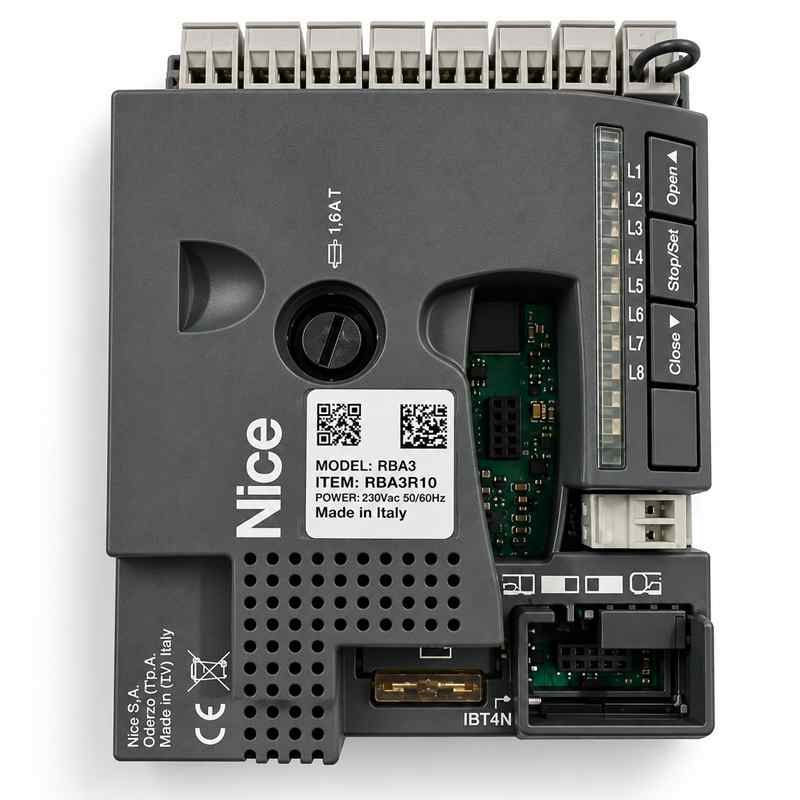
NICE RBA3 ROBUS Sliding Gate Motor Control Board UAE
Genuine NICE Product
UAE Delivery
Technical Support
Price 650 AED In Stock
Original NICE RBA3 Replacement Control Unit with BlueBUS
The NICE RBA3 Control Board is an original replacement electronic control unit designed for selected older-generation NICE sliding gate motors, especially the classic ROBUS range and selected older RUN1500 installations.
The RBA3 manages the complete gate automation cycle, including motor movement, travel learning, safety inputs, BlueBUS accessories, opening and closing commands, gate status indication and compatible NICE radio receivers.
It is primarily used when repairing an existing NICE sliding gate motor where the original RBA3 electronic control board has failed and the rest of the gearmotor remains mechanically serviceable.
NICE RBA3 Key Features
- Original NICE replacement control unit
- Model: RBA3
- Designed for selected classic NICE ROBUS sliding gate motors
- Compatible with NICE BlueBUS accessories
- Automatic recognition of connected BlueBUS devices
- Automatic gate travel and limit learning
- Adjustable motor force
- Adjustable motor speed
- Automatic closing function
- Pedestrian / partial-opening functions where programmed
- STOP safety input
- STEP-BY-STEP command input
- OPEN command input
- CLOSE command input
- Gate Open Indicator output
- Flashing-light output
- SM radio receiver connector
- External aerial connection
- Suitable for gate repair and board replacement
NICE RBA3 Compatibility
| Motor / Platform | RBA3 Compatibility |
| NICE RB400 | Yes – classic ROBUS generation |
| NICE RB250HS | Yes – documented with RBA3 |
| NICE RB500HS | Yes – documented with RBA3 |
| NICE RB600 | Yes – classic ROBUS generation |
| NICE RB600P | Yes |
| NICE RB1000 | Yes – classic ROBUS generation |
| NICE RB1000P | Yes |
| NICE RUN1500 | Used on older RUN1500 platform – verify exact board revision |
| New RBS400 / RBS600 / RBS600HS | No – new generation uses MCU1 platform |
Important Generation Check
The NICE ROBUS family has been updated over time.
The classic models such as RB400, RB600, RB1000 and RB500HS are associated with the RBA3 control architecture.
The newer ROBUS generation identified by model codes such as RBS400, RBS600 and RBS600HS uses a newer control architecture such as MCU1.
Therefore, do not order an RBA3 only because the motor cover says “ROBUS 600.” Always check the exact motor code and existing control-board label.
How to Confirm RBA3 Compatibility
Before ordering, check:
- Motor model label
- Existing control-board label
- RBA3 or board revision printed on the PCB
- Motor generation
- Terminal layout
- Radio receiver socket
- BlueBUS connection layout
BlueBUS Technology
The RBA3 supports NICE BlueBUS technology.
BlueBUS allows compatible safety and control accessories to share a two-wire connection carrying both electrical power and communication signals.
Compatible BlueBUS devices are connected in parallel and are then learned by the control unit.
BlueBUS Device Learning
After replacing the board or changing connected BlueBUS devices, the controller may need to perform device recognition.
The board identifies the configuration of compatible BlueBUS accessories connected to the system.
BlueBUS Photocells
Compatible BlueBUS photocells such as selected NICE EPMB, MOFB or related BlueBUS models can be used where supported by the installed system.
Do not connect a conventional relay photocell to the BlueBUS terminal as if it were a BlueBUS device.
STOP Safety Input
The STOP input can be used with suitable safety devices.
NICE documentation supports normally-open, normally-closed and 8.2 kΩ constant-resistance configurations when correctly learned and configured.
STEP-BY-STEP Input
The P.P. / Step-by-Step input accepts a normally-open command contact.
This is commonly used for:
- Push buttons
- External radio receivers
- GSM gate openers
- Access-control relays
- Key selectors
The external device should normally provide a momentary dry-contact command rather than supplying voltage into the input.
OPEN Input
The OPEN input accepts a normally-open contact and commands an opening movement according to the controller configuration.
CLOSE Input
The CLOSE input accepts a normally-open contact and commands a closing movement according to the controller configuration.
Push Button Connection
A simple normally-open push button can normally be connected to the appropriate P.P. command terminals for step-by-step operation.
Depending on programming, repeated commands may perform sequences such as open, stop and close.
External GSM Controller Connection
A GSM gate opener should normally connect its dry relay contact to a command input such as P.P. / STEP-BY-STEP or OPEN.
The GSM relay should not directly power the sliding gate motor.
Gate Open Indicator Output
The RBA3 provides a programmable gate-status / S.C.A. output.
Official ROBUS documentation specifies connection of a 24 V warning lamp up to 4 W. The output may also be programmable for other functions depending on the board revision and programming table.
Flashing-Light Output
The RBA3 provides a dedicated FLASH output for a compatible NICE flashing light.
Older ROBUS documentation specifies a flashing-light output intended for a compatible low-voltage NICE lamp, historically including LUCYB-type lamps.
Always verify the exact RBA3 revision and lamp specification before connecting a replacement flashing light.
Do Not Automatically List ELAC as Compatible
Your current page lists both ELDC and ELAC as compatible accessories.
This is too broad.
ELAC operates from 90–240 VAC, while the older RBA3 flashing-light architecture is associated with a low-voltage flashing output.
Therefore, do not advertise ELAC as a direct RBA3 flashing-light accessory without an external interface and exact wiring verification.
Radio Receiver Connector
The RBA3 includes an SM-type radio receiver connector for compatible NICE plug-in radio receivers.
Older NICE manuals reference compatible SM-series receiver modules, while later installations may use compatible NICE OXI-family receivers depending on board version.
OXIBD Compatibility
Do not simply state that every RBA3 accepts every modern bidirectional receiver feature.
A compatible OXIBD module may operate where the board/interface supports it, but advanced bidirectional functions depend on the complete radio and automation architecture.
Always verify the receiver and board generation.
OX2 Is Not a Plug-In Receiver
Your current live page lists NICE OX2 together with plug-in radio receivers.
The OX2 is a pre-wired external two-channel receiver, not an SM plug-in receiver.
It can still be connected externally to suitable command inputs, but it should not be presented as plugging directly into the RBA3 SM receiver socket.
Aerial Input
The control architecture includes an aerial input for compatible radio-receiver installations.
NICE technical documentation specifies approximately 52 Ω for an RG58 or similar antenna arrangement.
Automatic Travel Learning
The RBA3 can learn the gate travel and connected devices as part of the commissioning procedure.
Correct travel learning should be performed after replacing the board, changing limit components or modifying important mechanical settings.
Gate Position and Limit Learning
After installing a replacement controller, the gate should be mechanically checked and the controller should be commissioned according to the exact motor manual.
Do not assume that fitting the board alone restores all travel parameters.
Obstacle Detection
The RBA3 can regulate motor force and detect abnormal resistance as part of the automation control strategy.
Obstacle response depends on correct motor setup, force adjustment, learned travel and the mechanical condition of the gate.
It should not be treated as a replacement for required photocells or other safety devices.
Adjustable Motor Force
The controller provides programmable force levels.
The force should be set only as high as necessary for reliable gate movement.
If a gate requires excessive force, inspect the mechanical system rather than compensating only through electronic adjustment.
Check Gate Mechanics Before Increasing Force
Inspect:
- Gate wheels
- Track condition
- Rack alignment
- Pinion engagement
- Gate level
- End stops
- Mechanical resistance
Adjustable Speed
RBA3 programming supports adjustable motor-speed settings on compatible motor models.
The available speed and behaviour depend on the specific ROBUS or RUN motor connected to the board.
Automatic Closing
Automatic closing can be enabled and configured through the controller programming where required.
Before using automatic closing, ensure that the required photocells and safety devices are installed and operating correctly.
Pedestrian Opening
Partial or pedestrian opening can be configured on compatible installations.
This allows the sliding gate to open only part of its full travel for pedestrian access.
Master-Slave Operation
Classic ROBUS systems using RBA3 support configurations where two sliding gate operators can work together in a Master-Slave arrangement.
In such a system, accessories and the radio receiver are generally connected to the Master unit, while each operator retains its own motor/control hardware.
Programming Buttons and LEDs
The RBA3 uses onboard programming buttons and status LEDs for setup, diagnostics and parameter configuration.
The LED indications should be interpreted according to the exact ROBUS/RBA3 manual because they can indicate learned devices, active functions or faults.
Fault Diagnostics
When troubleshooting an RBA3 system, check:
- Mains supply
- Board fuse
- BlueBUS LED behaviour
- Safety-input LEDs
- Limit system
- Motor wiring
- Radio receiver
- Command inputs
- Stored fault indications
BlueBUS LED
During normal operation, the BlueBUS/status LED provides diagnostic information.
Unusual flashing sequences should be checked against the exact RBA3 manual rather than interpreted generically.
Gate Opens but Will Not Close
If the motor opens normally but does not close, common areas to inspect include:
- Photocell alignment
- BlueBUS device learning
- STOP input status
- Closing command settings
- Limit recognition
- Control-board fault
Gate Does Not Respond to Remote
If push-button operation works but remote operation does not, check:
- Plug-in radio receiver
- Remote frequency and coding
- Remote programming
- Aerial connection
- Receiver memory
Board Is Dead
If the RBA3 has no LEDs and no output, inspect the supply and fuse first.
A completely inactive board does not always mean the PCB itself has failed; upstream supply faults should be ruled out before replacement.
Board Replacement
A typical RBA3 replacement procedure involves:
- Disconnecting mains power.
- Recording or photographing every existing connection.
- Confirming the replacement board is the correct RBA3 revision.
- Removing the radio receiver and reusable accessories where applicable.
- Replacing the damaged board.
- Reconnecting motor, limit, BlueBUS, STOP and command wiring.
- Reinstalling the compatible radio receiver.
- Performing device recognition.
- Performing travel learning.
- Checking force, speed and automatic-close settings.
- Testing all safety devices.
- Testing manual and remote commands.
Professional Replacement Recommended
The RBA3 is connected to a mains-powered gate automation system.
Replacement should be carried out by a competent gate automation technician who can correctly identify the board, wiring, motor generation and safety setup.
Do Not Replace the Board Without Finding the Cause
If an old RBA3 has failed, check for the underlying cause before fitting a new controller.
Possible causes can include:
- Mains surge
- Water ingress
- Shorted accessory wiring
- Damaged motor cable
- Incorrect external wiring
- Failed flashing light
- Damaged photocells
- Lightning or electrical disturbance
New ROBUS RBS Series Warning
The latest NICE ROBUS generation should not be confused with the classic RB-series motors.
Newer models such as:
- RBS400
- RBS600
- RBS600HS
use the newer control architecture and should not be sold an RBA3 replacement board simply because the motor is branded ROBUS.
RB400 vs RBS400
RB400 is the classic ROBUS model associated with RBA3 documentation.
RBS400 is a newer-generation model using a different control platform.
RB600 vs RBS600
RB600 is the older ROBUS 600 platform documented with RBA3.
RBS600 is the new-generation ROBUS 600 platform and should not be treated as the same board architecture.
RB1000 Compatibility
The classic RB1000 / RB1000P models are officially associated with RBA3 documentation.
Check the existing board label before replacement because motors may have been modified or repaired previously.
RB500HS Compatibility
The classic high-speed RB500HS is also documented with RBA3.
Its motor parameters differ from standard ROBUS models, so the correct programming values and motor type must be respected.
RUN1500 Compatibility
Older NICE catalogue documentation lists RBA3 as the replacement control unit for RUN1500.
Because RUN products also evolved over time, verify the exact board revision and wiring before ordering.
Do Not List RUN1800 or RUN2500 as RBA3
NICE documentation distinguishes the larger RUN platforms from RBA3.
RUN1800 and RUN2500 use different control-board families and should not be added to the RBA3 compatibility list.
Package Contents
- 1 × NICE RBA3 Replacement Control Board
Radio receiver, enclosure, motor, photocells, flashing light, cables and programming accessories should only be shown as included if they are physically supplied with your package.
NICE RBA3 Repair & Replacement UAE
RBA3 control-board supply, replacement, programming and troubleshooting support is available for compatible NICE sliding gate motors across Dubai, Sharjah, Abu Dhabi, Ajman, Ras Al Khaimah, Fujairah, Umm Al Quwain and Al Ain.
Why Choose NICE RBA3?
- Original replacement board for supported classic NICE motors
- BlueBUS accessory support
- Automatic device recognition
- Travel learning
- Adjustable speed and force
- Automatic closing
- Pedestrian opening
- Dedicated safety inputs
- SM radio receiver interface
- Suitable for restoring older ROBUS installations
Buy NICE RBA3 Control Board UAE
Buy the NICE RBA3 sliding gate motor control board in UAE for compatible older-generation NICE ROBUS and selected RUN1500 systems.
Before ordering, confirm the motor model and existing PCB code to avoid confusing classic RB-series motors with the newer RBS-generation ROBUS control units.
Supply, installation, programming and repair support are available throughout Dubai, Sharjah, Abu Dhabi, Ajman, Al Ain, Ras Al Khaimah, Fujairah and Umm Al Quwain.
Frequently Asked Questions
What is NICE RBA3?
RBA3 is an electronic control board used in selected classic NICE ROBUS sliding gate motors and older RUN1500 installations.
Does RBA3 work with NICE RB400?
Yes. NICE documentation explicitly associates RBA3 with the classic RB400 generation.
Does RBA3 work with NICE RB600?
Yes. Classic RB600 and RB600P models are documented with RBA3.
Does RBA3 work with NICE RB1000?
Yes. Classic RB1000 and RB1000P models are documented with RBA3.
Does RBA3 work with RB500HS?
Yes. NICE documentation associates the classic RB500HS with RBA3.
Does RBA3 work with RUN1500?
Older NICE catalogue documentation lists RBA3 as a replacement control unit for RUN1500. Verify the exact existing board revision before ordering.
Does RBA3 work with new RBS400 or RBS600?
No. The newer RBS-generation ROBUS motors use a newer control platform such as MCU1.
Does RBA3 support BlueBUS?
Yes. It supports compatible NICE BlueBUS devices connected through the dedicated two-wire BlueBUS terminal.
Can I connect a push button?
Yes. A normally-open push button can be connected to the appropriate command input such as P.P. / Step-by-Step.
Can I connect a GSM gate opener?
Yes. A suitable GSM controller can normally use its dry relay contact to operate a command input such as OPEN or P.P.
Can I connect NICE EPMB photocells?
Where the exact board and photocell generation are compatible with BlueBUS, yes. Perform BlueBUS device recognition after installation.
Can I connect NICE EPM conventional photocells directly to BlueBUS?
No. Conventional relay photocells and BlueBUS photocells use different connection methods.
Does RBA3 support a radio receiver?
Yes. It provides an SM-type receiver connector for compatible NICE radio receivers.
Does NICE OX2 plug directly into RBA3?
No. OX2 is an external pre-wired relay receiver. It can be integrated through suitable command inputs but is not the SM plug-in receiver type.
Does RBA3 detect obstacles?
The controller can monitor motor effort and react to abnormal resistance when correctly configured, but this does not replace photocells and required safety devices.
Do I need to program a new RBA3 after installation?
Yes. Device recognition, gate travel learning and operating parameters should be checked and commissioned after replacement.
Do you provide RBA3 replacement in UAE?
Yes. Control-board replacement, programming and troubleshooting support are available for compatible NICE gate systems throughout the UAE.
Frequently Asked Questions
Is this NICE product suitable for UAE installation?
Yes, this NICE product is suitable for residential, commercial and industrial gate automation applications in UAE when selected according to gate size, weight and usage.
Do you provide installation support?
Yes, installation and technical support is available in Dubai, Sharjah, Abu Dhabi and other UAE locations.
Can I order this product on WhatsApp?
Yes, you can use the WhatsApp order button on this page to request price, availability and delivery details.