

NICE AUTOMATION UAE
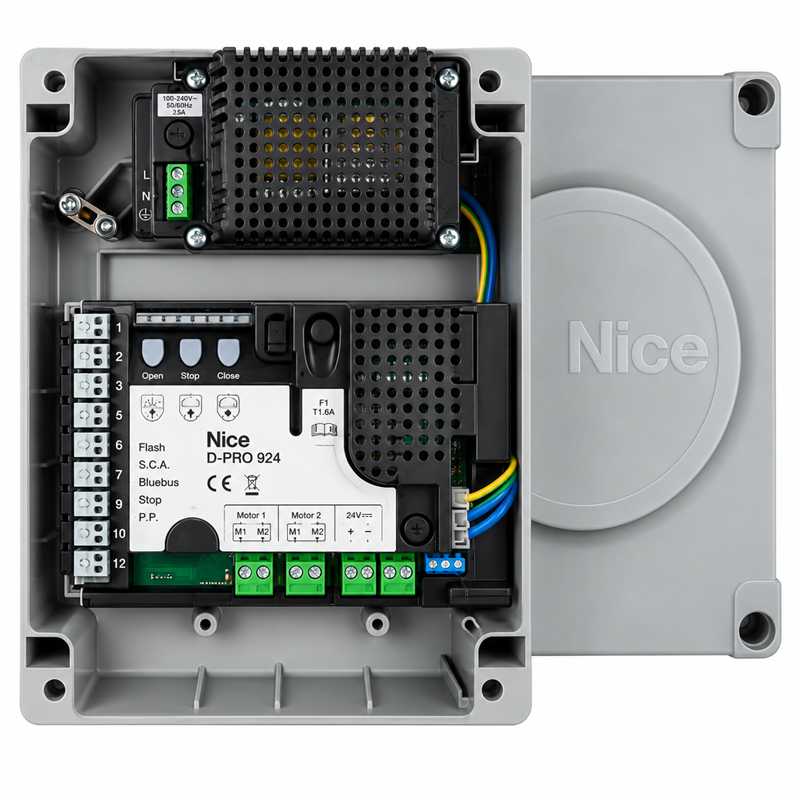
NICE MC824H 24 V Swing Gate Control Unit UAE
Genuine NICE Product
UAE Delivery
Technical Support
Price 999 AED In Stock
NICE MC824H BlueBUS Controller for 24 V Encoder Swing Motors
The NICE MC824H Control Unit is an original NICE electronic control panel designed for compatible 24 VDC swing gate motors equipped with encoder feedback.
The MC824H can control one or two swing gate motors and combines motor control, encoder management, NICE BlueBUS safety technology, automatic device learning, gate-position learning, partial opening, electric-lock control, flashing-light output, backup battery support and compatibility with NICE Opera / BusT4 accessories.
It is intended for compatible 24 V NICE swing gate operators including selected TOONA, HYKE, M-FAB, L-FAB, X-FAB, TITAN and high-speed motor families. Exact motor-code compatibility must always be checked before installation.
NICE MC824H Key Features
- Original NICE control unit
- Model: MC824H
- For one or two compatible 24 V swing gate motors
- Encoder-compatible motor control
- 230 VAC ±10%, 50/60 Hz mains input
- 24 VDC motor architecture
- 200 W nominal input power
- BlueBUS accessory interface
- Up to 15 BlueBUS units according to current Nice specification
- Automatic BlueBUS device learning
- Automatic STOP-input learning
- Automatic gate movement learning
- Automatic slowdown-point calculation
- Partial / pedestrian opening
- OPEN command input
- CLOSE command input
- Step-by-Step command input
- STOP safety input
- Electric-lock output
- ELDC flashing-light output
- SM plug-in radio receiver socket
- IBT4N / Opera compatibility
- PS324 / backup battery connector
- IP54 complete enclosure
Official MC824H Technical Specifications
| Brand | NICE |
| Model | MC824H |
| Application | One or two compatible 24 V swing gate motors with encoder |
| Standard Mains Supply | 230 VAC ±10%, 50/60 Hz |
| MC824H/V1 Supply | 120 VAC ±10%, 50/60 Hz |
| Nominal Input Power | 200 W |
| Motor Fuse | 15 A for MC824H |
| Standby Activation | After approximately 5 minutes when configured |
| Flashing-Light Output | For NICE ELDC |
| Electric-Lock Output | 12 VAC, maximum 15 VA |
| Gate-Open Indicator Output | 24 V, maximum 4 W |
| BlueBUS | Yes |
| Maximum BlueBUS Load | 15 BlueBUS units |
| STOP Input | NO / NC / 8.2 kΩ with automatic learning |
| Step-by-Step Input | Normally-open dry contact |
| OPEN Input | Normally-open dry contact |
| CLOSE Input | Normally-open dry contact |
| Radio Receiver Socket | SM connector |
| Aerial Input | 50 Ω, RG58 or equivalent |
| Operating Temperature | -20°C to +55°C |
| Protection Rating | IP54 with enclosure correctly assembled |
| Dimensions | 310 × 232 × 122 mm |
| Weight | 4.1 KG |
Official NICE MC824H Motor Compatibility
The latest NICE MC824H documentation provides a selectable motor list. Compatible motors include specific models from several 24 V swing gate families.
| Motor Group | Compatible NICE Models |
| HYKE / MB Group | MB4024, MB5024, HY7024, HY7124 |
| M-FAB | MFAB3024 |
| TOONA / X-FAB / L-FAB | TO4024, XFAB2124, LFAB4024 |
| TOONA | TO5024, TO5024I |
| TOONA / High-Speed | TO7024, TO6024HS |
| B-FAB | BFAB5024 |
| High-Speed Group | METROELITE, MFAB3024HS, TO5024HS |
| WINGO / TITAN High-Speed Group | WINGOELITE, WG3524HS, LFAB4024HS, TTN3724HS, TTN6024HS |
Motor compatibility depends on the exact model code and MC824H revision. Do not advertise all TOONA, all HYKE, all L-FAB or all TITAN motors as compatible without checking the model suffix.
MC824H Is for 24 V Motors
The MC824H is designed for compatible 24 V swing gate motors.
It should not be confused with the NICE MC800, which is intended mainly for compatible 230 V swing gate motors.
MC824H vs MC800
| Control Unit | Motor Architecture |
| MC824H | Compatible 24 V motors with encoder support |
| MC800 | Compatible 230 V swing gate motors |
Example: TO5015 vs TO5024
- TO5015 – 230 V TOONA → MC800 family
- TO5024 – 24 V TOONA with encoder → MC824H
This is why the exact motor model is more important than simply writing “TOONA compatible.”
Example: LFAB4000 vs LFAB4024
- LFAB4000 – 230 V underground motor → MC800
- LFAB4024 – 24 V encoder motor → MC824H
BlueBUS Technology
The MC824H provides a dedicated NICE BlueBUS connection for compatible safety and control accessories.
BlueBUS uses two wires to carry both power and communication signals and does not require polarity.
Maximum BlueBUS Capacity
The current NICE technical specification permits a maximum load of 15 BlueBUS units.
Nice specifies this capacity as up to:
- 6 pairs of standard BlueBUS photocells such as EPMB or EPLB
- Additional photocell pairs assigned as opening devices where permitted
- Up to 4 compatible BlueBUS command devices such as EDSB or ETPB
Always follow Nice addressing limits when planning the installation.
Correct Your Current “12 Devices” Statement
Your current page says BlueBUS supports up to 12 devices.
The current NICE MC824H technical table states 15 BlueBUS units maximum.
Therefore, I recommend changing the product page to:
BlueBUS output supports up to 15 BlueBUS units, subject to device type and addressing limits.
NICE EPMB Photocells
The current MC824H manual explicitly lists NICE EPMB among compatible BlueBUS devices.
EPMB can be connected directly to the BlueBUS terminals and must be correctly addressed and learned.
NICE EPSB and EPLB
Other compatible BlueBUS photocell families include EPSB and EPLB where supported by the required installation layout.
NICE EPM Conventional Photocell
NICE EPM is a conventional relay-output photocell and is not the same as EPMB.
Do not connect EPM directly to BlueBUS as though it were a BlueBUS device.
For this page, EPMB is the cleaner direct NICE safety-photocell recommendation.
Encoder Support
The MC824H provides separate encoder inputs for the compatible 24 V motors.
Encoder feedback allows the control unit to monitor motor movement and gate position more precisely than a simple timed controller.
Encoder Wiring
For compatible motors, the motor-power cable and encoder cable must be correctly connected to the corresponding M1 or M2 control channels.
The official current manual indicates that encoder polarity does not need to be observed on the dedicated encoder input.
M1 and M2 Motor Control
The MC824H can control:
- One compatible 24 V swing gate motor
- Two compatible 24 V swing gate motors
For double-leaf gates, the controller manages each motor separately.
Motor Type Selection
The current MC824H includes a dedicated motor selector.
The installer must select the correct motor group before gate-position learning.
Using the wrong motor selection is not permitted and can result in incorrect movement parameters.
Automatic Device Learning
After initial power-up, the MC824H learns the connected devices on the BlueBUS and STOP inputs.
The learning procedure must also be repeated whenever a BlueBUS device is added or removed.
Automatic Gate Position Learning
Once the correct motor group has been selected, the MC824H learns the gate movement and calculates operating positions.
This includes automatic calculation of slowdown points and partial-opening positions where applicable.
Soft Start and Soft Stop
The MC824H manages motor acceleration and deceleration to provide controlled gate movement.
Correct operation depends on correct motor selection, gate geometry, mechanical stops and commissioning.
Obstacle-Sensitive Operation
The controller uses motor and encoder information to detect abnormal movement or resistance when correctly configured.
This function does not replace required photocells, safety edges or other safety devices.
STOP Safety Input
The STOP input automatically learns common safety-contact types including:
- Normally-open contacts
- Normally-closed contacts
- 8.2 kΩ resistive safety contacts
If the learned condition changes, the controller generates a STOP command.
Step-by-Step Input
The SbS input accepts a normally-open dry contact.
This can be used with:
- Push buttons
- External radio receivers
- GSM gate controllers
- RFID readers
- Intercom relays
- ANPR access-control systems
OPEN Input
The dedicated OPEN terminal accepts a normally-open dry contact and commands the opening function.
CLOSE Input
The dedicated CLOSE terminal accepts a normally-open dry contact and commands the closing function.
GSM Gate Opener Connection
A suitable GSM gate opener can operate the MC824H using its isolated dry relay contact.
The GSM relay should normally pulse the OPEN or Step-by-Step input.
Never use a GSM controller to directly power the swing gate motor.
RFID and Access Control
An RFID reader, keypad, intercom or other access-control system can provide a momentary dry-contact command to the MC824H.
Electric Lock Output
The MC824H provides a dedicated 12 VAC electric-lock output rated up to 15 VA.
This is useful where the installed swing gate motor or gate geometry requires an electric lock.
Electric Lock Requirement
The need for an electric lock depends on:
- Motor model
- Gate leaf length
- Gate leaf weight
- Wind load
- Solid gate construction
- Hinge geometry
- Manufacturer-specific motor requirements
Always follow the motor manual rather than assuming every MC824H installation requires or does not require an electric lock.
Flashing-Light Output
The current NICE MC824H specification identifies one NICE ELDC flashing light for the FLASH output.
NICE ELDC Is Correct
The NICE ERA ELDC is the appropriate current flashing-light family for MC824H.
ELDC operates from 12–36 VDC and is designed for low-voltage NICE automation systems.
Remove ELAC from Direct Compatibility
Your current live page lists both ELAC and ELDC.
ELAC is a 90–240 VAC flashing light and should not be described as the standard direct FLASH-output accessory for MC824H.
Use:
NICE ELDC low-voltage LED flashing light.
Radio Receiver Socket
The MC824H includes a standard NICE SM plug-in radio receiver connector.
The current technical manual explicitly identifies compatible receiver families including:
- SMXI
- OXI
- OXIFM
NICE OXIBD
Current Nice system compatibility catalogues also list OXIBD with the MC824H product family.
OXIBD is a modern 433.92 MHz bidirectional receiver, but the actual remote transmitter must support the appropriate radio protocol for the required functions.
NICE OXI
OXI is a compatible plug-in receiver family for MC824H where the required coding and remote family match.
NICE OXIFM Frequency Warning
OXIFM operates at 868.46 MHz.
Do not list normal 433.92 MHz remotes as compatible with OXIFM simply because they are Nice products.
Remote Control Compatibility
Remote compatibility depends on the installed radio receiver.
Always verify:
- Receiver model
- Frequency
- Radio coding protocol
- Remote model
Frequency alone does not guarantee compatibility.
PS324 Backup Battery
The MC824H has a dedicated connector for an emergency / backup battery system.
NICE documentation references PS324 for compatible MC824H systems.
Important Current PS324 Revision Note
The latest Nice manual includes an important warning for current control-unit revisions:
If a PS324 battery pack is used instead of the newer standby-compatible backup arrangement, a separately available connection cable may be required and standby mode must be configured correctly.
Therefore, do not advertise:
“PS324 plugs directly into every MC824H revision with no additional parts.”
Safer wording:
Compatible with NICE backup battery systems including PS324 on supported MC824H revisions; exact cable and standby configuration must be checked for the installed control-unit generation.
Solemyo Solar Compatibility
The current MC824H architecture also provides a connection for the NICE Solemyo photovoltaic power system.
When powered by Solemyo, the automation must not be simultaneously connected to the mains supply.
IBT4N Interface
The MC824H provides a dedicated connector for the optional IBT4N interface.
This enables connection of compatible NICE BusT4 / Opera devices.
O-View Programming
NICE provides dedicated O-View programming documentation for MC824H.
With the correct IBT4N interface, O-View can be used by a professional installer for advanced programming, diagnostics and configuration.
Opera System
The MC824H belongs to the Nice Opera automation architecture and can integrate with compatible programming and automation-management accessories.
MC824H Generations
This is especially important for your product page.
NICE currently publishes separate documentation for:
- MC824H up to September 2018
- MC824H from September 2018 to September 2025
- MC824H / MC824L from October 2025
Therefore, terminal layout, programming details and accessory behaviour can differ slightly between generations.
When replacing an existing MC824H, always verify the exact board/control-unit revision.
MC824H vs MC824HHS
The MC824HHS is a separate control-unit version and should not be treated as identical to standard MC824H.
Do not combine the two model pages unless you have confirmed that your stock and specifications refer to the same unit.
MC824H vs MC824L
The latest 2025 manual covers both MC824H and MC824L, but they are separate model versions.
The MC824H includes encoder connections and uses a 15 A motor fuse, while MC824L has different architecture and limits.
IP54 Protection
The complete MC824H control unit is rated IP54 when the original enclosure is intact and correctly installed.
The current Nice manual explicitly states that the enclosed unit can be installed outdoors when properly mounted and sealed.
Outdoor Installation
For outdoor mounting:
- Install on a solid vertical surface
- Keep the bottom of the enclosure at least approximately 40 cm above ground
- Use suitable cable glands
- Prevent water entering through conduit
- Keep the cover correctly closed
UAE Installation Conditions
Your current page says the MC824H is designed to withstand high temperatures, dust and humidity.
I recommend replacing that marketing statement with the official limits:
Operating temperature: -20°C to +55°C. Protection rating: IP54 when the original enclosure is correctly installed and intact.
For UAE installations, avoid positions where the enclosure can exceed the official temperature limit due to direct solar heating or poor ventilation.
Do Not Claim Unlimited High-Temperature Operation
+55°C is the official maximum operating-temperature specification for the current MC824H manual.
Ambient air temperature and internal enclosure temperature can be higher in direct UAE sunlight, so suitable installation location and protection are important.
Motor Direction Check
After wiring M1 and M2, confirm both gate leaves move in the correct opening direction before completing automatic gate-position learning.
Gate Position Learning
After selecting the exact motor type, carry out the automatic position-learning procedure.
The controller uses the motor encoder feedback to learn and manage movement positions.
Gate Opens but Does Not Close
If the gate opens but will not close, check:
- BlueBUS photocells
- STOP input
- Device-learning status
- CLOSE input
- Encoder wiring
- Gate-position learning
- Mechanical stops
Only One Gate Leaf Moves
If only one leaf operates, check:
- M1 and M2 motor connections
- Encoder 1 and Encoder 2 connections
- Selected motor type
- Single- or double-leaf programming
- Motor condition
Motor Moves in Wrong Direction
Incorrect motor wiring or setup must be corrected before gate-position learning.
Do not leave the automation operating with reversed motor direction.
BlueBUS Fault
If BlueBUS devices are added or removed, repeat the device-learning procedure.
Do not bypass a photocell simply to clear a BlueBUS fault.
Remote Does Not Work
If wired commands operate correctly but the remote does not, check:
- Receiver model
- Receiver installation
- Remote frequency
- Remote coding protocol
- Receiver memory
- Aerial connection
Replacing an Existing MC824H
- Disconnect mains power.
- Disconnect backup battery or Solemyo power if fitted.
- Confirm the existing MC824H revision.
- Confirm the exact motor models.
- Photograph all wiring.
- Label M1, M2, Encoder 1 and Encoder 2 wiring.
- Label BlueBUS and STOP connections.
- Label OPEN, CLOSE and Step-by-Step wiring.
- Remove the radio receiver where necessary.
- Install the replacement MC824H.
- Reconnect all motor and encoder wiring.
- Reconnect BlueBUS devices.
- Reconnect the electric lock and flashing light.
- Reconnect access-control inputs.
- Select the exact motor type.
- Perform BlueBUS / STOP device learning.
- Perform gate-position learning.
- Check motor direction.
- Check slowdown and force settings.
- Test photocells and safety devices.
- Test electric lock operation where fitted.
- Test automatic closing where enabled.
- Complete multiple full opening and closing cycles.
Professional Installation Recommended
The MC824H contains mains-voltage circuitry and controls one or two high-powered moving gate leaves.
Installation, replacement and programming should be performed by an experienced gate automation technician familiar with NICE BlueBUS, encoder motors, swing gate geometry and safety-device commissioning.
Check Gate Mechanics First
Before adjusting electronic force or obstacle sensitivity, check:
- Gate hinges
- Leaf alignment
- Mechanical opening stops
- Mechanical closing stops
- Motor mounting geometry
- Leaf weight and length
- Wind loading
- Solid-gate surface area
- Electric-lock requirement
Package Contents
- 1 × NICE MC824H Control Unit with Enclosure
Radio receiver, remotes, photocells, ELDC flashing light, electric lock, PS324, IBT4N and other accessories should only be listed as included when they are physically supplied with your product.
NICE MC824H Control Unit UAE
The NICE MC824H is suitable for compatible swing gate automation installed at:
- Villas
- Residential compounds
- Apartment buildings
- Commercial properties
- Factories
- Warehouses
- Industrial entrances
- High-usage private gates
NICE MC824H Supply & Installation UAE
Supply, replacement, programming, installation and troubleshooting support for compatible NICE MC824H swing gate automation systems is available throughout Dubai, Sharjah, Abu Dhabi, Ajman, Ras Al Khaimah, Fujairah, Umm Al Quwain and Al Ain.
Why Choose NICE MC824H?
- Original NICE 24 V swing gate control unit
- Encoder motor management
- Controls one or two motors
- BlueBUS technology
- Up to 15 BlueBUS units
- Automatic device learning
- Automatic travel learning
- Electric-lock output
- ELDC flashing-light compatibility
- SM receiver slot
- PS324 / backup power support
- Opera / IBT4N compatibility
- IP54 enclosed control unit
Buy NICE MC824H Control Unit UAE
Buy the NICE MC824H 24 V swing gate control unit in UAE for compatible NICE encoder-equipped swing gate motors.
Before ordering, confirm the exact motor model and existing MC824H revision to make sure the control unit is correct for the installation.
Supply, professional installation, programming and technical support are available throughout Dubai, Sharjah, Abu Dhabi, Ajman, Al Ain, Ras Al Khaimah, Fujairah and Umm Al Quwain.
Frequently Asked Questions
What is NICE MC824H?
MC824H is a NICE control unit designed for one or two compatible 24 V swing gate motors with encoder feedback.
What is the MC824H power supply?
The standard current MC824H is specified for 230 VAC ±10%, 50/60 Hz. The MC824H/V1 variant is specified for 120 VAC.
Does MC824H output 24 V to the motors?
Yes. It is a 24 V motor-control architecture for compatible NICE swing gate operators.
Does MC824H support BlueBUS?
Yes. The current technical specification allows a maximum load of 15 BlueBUS units, subject to device and addressing limits.
Can I connect NICE EPMB photocells?
Yes. EPMB is specifically listed as a compatible BlueBUS device.
Can I connect NICE EPM directly to BlueBUS?
No. EPM is a conventional relay photocell, while EPMB is the BlueBUS version.
Which flashing light is correct?
The current MC824H technical specification identifies NICE ELDC for the flashing-light output.
Can I connect ELAC directly?
ELAC is a 90–240 VAC flashing light and should not be presented as the standard direct MC824H FLASH-output accessory.
Does MC824H support PS324?
Yes, but current revisions may require the correct connection cable and standby configuration. Verify the control-unit generation before installation.
Does MC824H have a radio receiver?
The control unit has an SM receiver socket. A compatible plug-in receiver such as OXI, OXIFM or another supported receiver must be selected according to the required radio system.
Does MC824H support OXIBD?
Current Nice system compatibility data lists OXIBD with MC824H systems. Verify the exact receiver and transmitter protocol before sale.
Can I connect O-View?
Yes, through the appropriate NICE IBT4N / BusT4 interface on compatible revisions.
Can I connect a GSM gate opener?
Yes. Use a dry relay contact to the OPEN or Step-by-Step command input. Never directly power the motor from the GSM controller.
Can MC824H control two swing gate motors?
Yes. It can control compatible M1 and M2 motors and manage their encoder feedback independently.
Does MC824H require programming after installation?
Yes. The exact motor group must be selected, connected devices learned, gate positions learned and all safety functions tested.
What is the MC824H protection rating?
IP54 when installed with the original enclosure intact and correctly sealed.
Do you provide NICE MC824H installation in UAE?
Yes. Supply, replacement, programming and technical support is available for compatible NICE swing gate automation throughout the UAE.
Frequently Asked Questions
Is this NICE product suitable for UAE installation?
Yes, this NICE product is suitable for residential, commercial and industrial gate automation applications in UAE when selected according to gate size, weight and usage.
Do you provide installation support?
Yes, installation and technical support is available in Dubai, Sharjah, Abu Dhabi and other UAE locations.
Can I order this product on WhatsApp?
Yes, you can use the WhatsApp order button on this page to request price, availability and delivery details.