
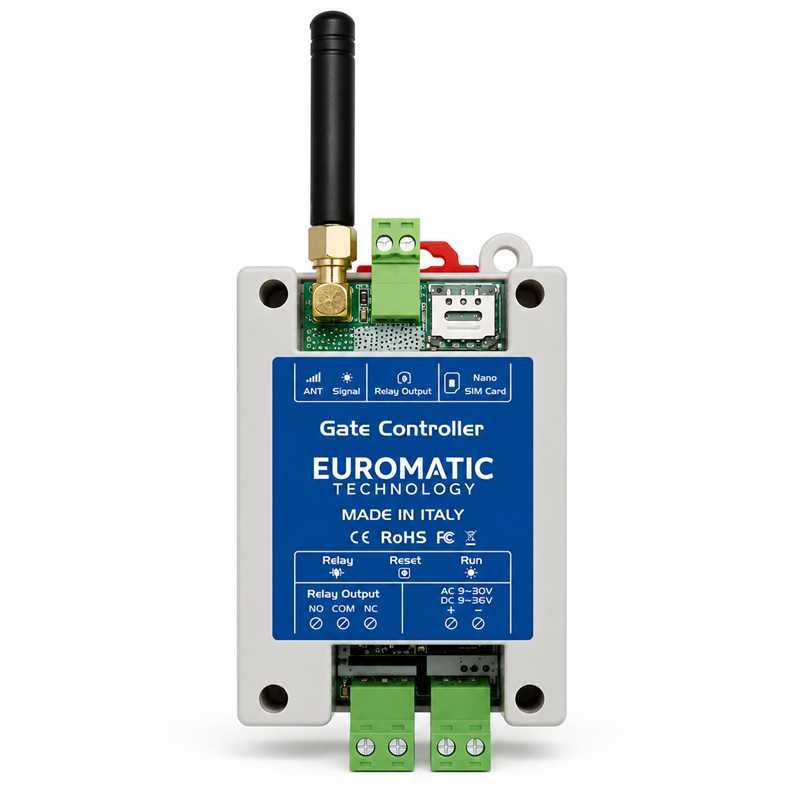

Mobile Phone Gate Access Controller for UAE
The 3G GSM Gate Opener Controller is a mobile-phone access control device designed to operate automatic gates, parking barriers, garage doors, rolling shutters, bollards and other compatible automation systems using an authorised phone call.
A Nano SIM card is installed inside the controller and authorised mobile numbers are stored in the system. When an approved user calls the SIM number, the controller checks the caller ID and activates its relay output to send an opening command to the connected gate motor, barrier or access-control system.
Because the controller can reject an authorised call before normal voice connection, gate operation can be completed without a normal call charge, subject to the SIM card, telecom provider and controller configuration.
3G GSM Gate Opener Key Features
- Mobile phone controlled gate access
- 3G GSM / mobile-network operation
- Nano SIM card support
- Authorised caller-ID verification
- Relay output for gate-control input
- Add or delete authorised users by SMS
- No traditional gate remote required
- No Wi-Fi required
- No local internet connection required for normal call operation
- Remote access from mobile-network coverage areas
- Supports multiple authorised users
- External wired switch input
- SMS confirmation functions depending on configuration
- Suitable for gates, barriers, garages and access systems
- Compact DIN-panel / enclosure-friendly design
Technical Specifications
| Product Type | 3G GSM Gate Access Controller |
| Control Method | Authorised Mobile Phone Call / SMS Management |
| SIM Card | Nano SIM |
| User Capacity | Up to 200 or 1200 Users Depending on Version |
| AC Power Supply | 9V–30V AC |
| DC Power Supply | 9V–36V DC |
| Current Consumption | Approx. 1 A |
| Relay Rating | Up to 3 A / 240V AC |
| Antenna | 50Ω SMA |
| External Switch Input | Supported |
| Working Temperature | -10°C to +60°C |
| Storage Temperature | -20°C to +60°C |
| Relative Humidity | 10%–90% RH |
| Dimensions | 96.5 × 50 × 31.5 mm |
| Weight | Approx. 88 g |
How the GSM Gate Opener Works
The controller is connected to the gate motor or access-control system through a relay contact.
When an authorised user calls the SIM card installed in the GSM controller:
- The controller reads the incoming caller ID.
- The telephone number is compared with the authorised-user list.
- If the number is authorised, the relay activates.
- The connected gate motor receives a push-button-style command.
- The gate, barrier or door opens according to the automation control-board programming.
No Gate Remote Required
Users can operate the automation using their normal mobile phones, reducing the need to distribute physical gate remotes or key fobs.
This can be particularly useful for villas, companies, apartment buildings, warehouses and sites where access permissions change regularly.
No Fixed Distance Limit from the Gate
Unlike a conventional radio remote control, the GSM controller does not depend on short-range 433 MHz or 868 MHz transmission from the user's handset.
The user can normally activate the system from any location where both the user's phone and the installed SIM have suitable mobile-network service.
Therefore, it is more accurate to say “no local radio-distance limitation” rather than promising literally unlimited operation under every telecom condition.
Caller ID Access Control
Access is based on the authorised mobile-phone numbers stored in the controller.
Unknown or unauthorised callers are ignored and should not activate the relay.
This makes the system useful when administrators need to add or remove access without distributing new physical remotes.
No Call Charge Function
Compatible GSM gate controllers can reject an authorised call after identifying the caller and activate the relay without completing a normal voice call.
This can avoid normal call charges, although actual charging behaviour can depend on the SIM card, network operator and telecom service configuration.
SMS User Management
Administrators can add or remove authorised telephone numbers using SMS commands supported by the controller.
This allows user management without physically visiting the controller for every change.
User Capacity
Your current product listing refers to versions supporting either 200 or 1200 authorised users.
Because these capacities represent different controller versions, do not advertise both as though every unit automatically supports 1200 users.
A better product-page statement is:
“User capacity: up to 200 or 1200 authorised telephone numbers depending on the selected controller version.”
Relay Output
The GSM controller operates the automation through a relay contact.
For most automatic gates and barriers, this relay should be connected to the control board's Step-by-Step, Start, Open or Push Button input, according to the motor manufacturer's wiring instructions.
Do Not Power the Gate Motor Through the Relay
The relay output is normally used as a control contact.
Do not use the GSM controller relay to directly power a gate motor unless the connected load and complete electrical design are specifically suitable for the relay rating.
For gate automation, the preferred method is normally a dry-contact connection to the motor control board.
Sliding Gate Motor Compatibility
The GSM gate opener can work with many sliding gate motors that provide an external push-button, Step-by-Step or OPEN input.
This includes compatible residential, commercial and industrial gate automation systems from different manufacturers.
Swing Gate Motor Compatibility
The controller can also be connected to compatible swing gate control boards using their external command input.
The GSM controller does not replace the swing-gate control unit; it simply provides the authorised opening command.
Parking Barrier Compatibility
Parking boom barriers commonly provide OPEN or push-button command terminals, making GSM control useful for employee, resident and visitor vehicle access.
Garage Door Opener Compatibility
The system can operate compatible garage door openers that provide a wired wall-button or external command input.
Rolling Shutter Compatibility
Rolling shutter systems can also be controlled where the installed shutter controller provides an appropriate low-voltage or dry-contact command input.
The exact wiring depends on whether the shutter controller uses separate OPEN/CLOSE commands or a single Step-by-Step input.
Automatic Bollard Compatibility
The relay output can be integrated with compatible automatic bollard control panels for authorised vehicle access.
Access Control Door Compatibility
The GSM controller can be integrated into suitable access-control systems where a dry-contact input is available.
For electric locks, maglocks and door-release circuits, the correct access-control relay and power-supply design should be used rather than assuming the GSM relay should directly power every lock.
External Push Button Input
The controller also supports an external wired-switch input according to your current technical listing.
This can be useful where a local reception button, guard-room switch or manual access button is required alongside mobile-phone control.
Suitable for Villas
A villa owner can authorise family members' phone numbers so that each approved mobile phone can operate the gate without carrying an additional remote control.
Suitable for Apartment Buildings
GSM access is particularly useful for apartment and residential parking systems where many residents require vehicle access.
Phone numbers can be added or removed as tenants or residents change.
Suitable for Warehouses and Factories
Commercial sites can authorise managers, drivers, employees or security personnel without distributing a large number of physical remotes.
Suitable for Gated Communities
Multi-user GSM versions can provide mobile-phone access to community entrances where authorised telephone-number management is preferred over conventional remote controls.
Suitable for Parking Facilities
The controller can activate compatible parking barriers for staff, residents, contractors and other authorised users.
3G Network Compatibility
This product page specifically advertises a 3G GSM controller.
Before installation, the exact modem module and supported network bands should be verified against the UAE SIM/network service that will be used.
This is especially important because mobile operators can modify, refarm or discontinue older network technologies over time.
3G vs 4G GSM Gate Opener
| Feature | 3G GSM Controller | 4G LTE Controller |
| Mobile Network | 3G / Supported Legacy Networks | 4G LTE / Supported Legacy Networks Depending on Module |
| Call-Based Gate Opening | Yes | Yes |
| Caller ID Access | Yes | Yes |
| SMS User Management | Yes | Yes |
| Recommended for New Installations | Check local 3G network support first | Generally more future-ready where LTE bands are supported |
3G vs Traditional Gate Remote
| Feature | GSM Gate Opener | Traditional Remote |
| Control Device | Mobile Phone | Dedicated Remote |
| Local Radio Range | Not limited by short-range gate radio | Limited by remote/receiver range |
| User Management | Phone Number / SMS | Receiver Memory |
| Physical Remote Required | No | Yes |
| SIM / Mobile Network Required | Yes | No |
3G GSM vs Wi-Fi Gate Controller
A GSM gate controller communicates through the mobile network using its SIM card, while a Wi-Fi gate controller normally depends on the property's internet connection and Wi-Fi coverage.
For remote sites without reliable Wi-Fi but with good cellular signal, GSM can be a practical solution.
Important SIM Card Requirements
Before installation, confirm:
- The SIM card is active
- The SIM supports the network technology required by the controller
- Caller ID is enabled
- SMS service is active if SMS programming will be used
- SIM PIN protection is disabled if required by the controller
- The account has sufficient validity or balance for required network services
Installation Method
A professional GSM gate opener installation normally includes:
- Safe power supply connection
- SIM card setup
- Antenna installation
- Relay connection to gate-control input
- Administrator-number programming
- Authorised-user programming
- Relay-time configuration
- Mobile-network signal test
- Opening-command testing
Relay Timing
For most gate motors, the GSM relay should provide a short pulse similar to pressing a wired push button.
The exact relay activation time depends on the connected control board and controller programming.
Normally Open and Common Wiring
Many gate automation systems require only the GSM relay's COM and NO contacts.
These are typically wired across the relevant gate-control input and common terminal.
Always verify the gate motor manual before wiring because terminal names vary between manufacturers.
Do Not Connect Unknown Voltage to the Gate Input
Many gate-control inputs expect a voltage-free contact.
Applying external voltage to an input designed only for a dry contact can damage the automation control board.
Professional installation is therefore recommended.
Mobile Network Signal
Reliable cellular signal at the installation point is essential.
If the controller is installed inside a steel gate cabinet or electrical enclosure, an external SMA antenna may improve reception.
50Ω SMA Antenna
Your current product specification lists a 50Ω SMA antenna connection.
This can allow the antenna to be positioned away from metal enclosures where required for better reception.
Operating Temperature
Your current product data lists an operating range of approximately -10°C to +60°C.
For UAE installations, the controller should still be fitted inside a suitable protected electrical enclosure, away from direct sunlight, water ingress and extreme enclosure temperatures.
Humidity
The listed operating humidity is approximately 10%–90% RH.
The controller should be protected from condensation and direct water exposure unless a suitable rated enclosure is provided.
Security Recommendations
- Use a secure administrator number
- Remove old staff or tenant numbers promptly
- Do not publish programming passwords
- Protect the SIM account
- Install the controller inside a locked enclosure
- Periodically review authorised users
- Keep SMS programming instructions private
GSM Controller Troubleshooting
If the GSM controller does not open the gate, check:
- Controller power supply
- SIM card activation
- Mobile-network signal
- Caller ID service
- Authorised phone number format
- Relay activation
- Relay-to-gate wiring
- Gate control-board input configuration
- Antenna connection
Gate Opens from Push Button but Not GSM
If the gate works normally from its local push button but does not operate through GSM, the problem is likely related to the GSM controller, SIM/network, authorised number, relay programming or relay wiring.
GSM Relay Activates but Gate Does Not Open
If the controller relay clicks but the gate does not move, verify that the relay is connected to the correct OPEN / START / STEP-BY-STEP input and common terminal.
Also confirm that the gate control input expects a dry-contact pulse.
Recommended UAE Package
- 1 × 3G GSM Gate Opener Controller
- 1 × GSM Antenna
- Power Supply if Physically Included
- Connection Accessories if Physically Included
- User / Programming Instructions if Included
SIM card and professional installation should be listed separately unless physically included in your sale package.
GSM Gate Opener Installation UAE
Professional GSM gate opener installation is available for compatible automatic gates, garage doors, parking barriers and access-control systems.
Installation and technical support are available across Dubai, Sharjah, Abu Dhabi, Ajman, Ras Al Khaimah, Fujairah, Umm Al Quwain and Al Ain.
Why Choose a GSM Gate Opener?
- Open gates from a normal mobile phone
- No separate remote control required
- No property Wi-Fi required for call-based operation
- Authorised caller-ID security
- Remote user management by SMS
- Suitable for multiple users
- Works with many existing gate control boards
- Useful for villas, buildings and commercial facilities
- Easy to add or remove authorised telephone numbers
- Professional installation available in UAE
Buy 3G GSM Gate Opener Controller UAE
Buy the 3G GSM Gate Opener Controller in UAE for mobile-phone access to compatible sliding gates, swing gates, garage doors, parking barriers, rolling shutters and access-control systems.
Supply, installation and technical support are available throughout Dubai, Sharjah, Abu Dhabi, Ajman, Al Ain, Ras Al Khaimah, Fujairah and Umm Al Quwain.
Frequently Asked Questions
What is a GSM gate opener?
It is a SIM-based controller that activates a gate or access system when an authorised mobile number calls the installed SIM card.
Does it need Wi-Fi?
No. Normal call-based operation uses the mobile network rather than property Wi-Fi.
Does the user need a gate remote?
No. An authorised mobile phone can be used instead.
Can I open the gate from another city or country?
Potentially yes, provided the mobile network, SIM service, caller-ID presentation and roaming conditions allow the controller to receive and recognise the call.
Are calls free?
Compatible controllers can reject an authorised call before a normal voice connection. Actual charging still depends on the telecom provider and SIM service.
How are users added?
Authorised telephone numbers can be added or removed using supported SMS programming commands.
How many users can be stored?
Your product family includes versions supporting up to 200 or 1200 users. Confirm the exact version before sale.
Can it work with a sliding gate motor?
Yes, where the sliding gate control board provides a compatible external command input.
Can it work with a swing gate?
Yes, using the appropriate START, OPEN or Step-by-Step input on a compatible swing gate control unit.
Can it work with a parking barrier?
Yes, where the barrier controller provides a compatible external opening input.
Can it operate a garage door?
Yes, where the garage-door opener provides a suitable wired-button or external command input.
Does it supply power to the gate motor?
Normally no. Its relay is used as a command contact for the gate control board.
Does it require a SIM card?
Yes. A suitable activated Nano SIM is required.
Is 3G still suitable in UAE?
The exact modem bands and current network support should be confirmed with the selected UAE telecom operator before installation, especially for new installations.
Do you provide installation in UAE?
Yes. Installation and technical support are available for compatible gate, barrier, garage-door and access-control systems throughout the UAE.
Frequently Asked Questions
Is this NICE product suitable for UAE installation?
Yes, this NICE product is suitable for residential, commercial and industrial gate automation applications in UAE when selected according to gate size, weight and usage.
Do you provide installation support?
Yes, installation and technical support is available in Dubai, Sharjah, Abu Dhabi and other UAE locations.
Can I order this product on WhatsApp?
Yes, you can use the WhatsApp order button on this page to request price, availability and delivery details.